
 Contact

Community
“SQL EDITOR”: An Essential Choice for No-Code Platforms
- Date2022.11.03
“SQL EDITOR”: An Essential Choice for No-Code Platforms
With the enforcement of strict social distancing during the COVID-19 pandemic, the Fourth Industrial Revolution—symbolizing automation and intelligence—has accelerated across the IT industry and society as a whole.
Traditionally, IT projects followed an SI model, requiring large-scale deployment of IT professionals for long-term projects. This approach faced limitations in responding quickly to such changes.
One major issue was the shortage of IT professionals. Learning and using development languages like C, Java, SQL, and HTML is difficult and complex. As a result, no-code and low-code platforms—enabling people without coding knowledge (citizen developers) to create and modify services—have gained significant traction. Many companies are already leveraging these platforms to build applications through citizen development.
Who Are Citizen Developers?
Citizen developers are business users who can create their own applications without specialized coding knowledge. The key difference from professional developers lies in the amount of coding involved in building applications.
Most citizen developers use no-code or low-code platforms, which replace direct coding with drag-and-drop functionality or graphical user interfaces (GUI).
To align with this trend, STEG’s EGENE platform has long pursued no-code and low-code strategies, continuously upgrading its platform.
For example, features like List Wizard, Relation Wizard, and SQL Wizard have transformed configuration screens—previously requiring JSON coding—into user-friendly UI/UX. Using Entity APIs, users can now perform basic configurations without SQL or other technical expertise.
However, while Entity APIs simplify single-table queries, creating list screens that require frequent joins across multiple tables or union-based aggregate queries remains challenging without SQL knowledge.
Ultimately, as long as SQL-based query writing is embedded in platform modules, achieving a fully no-code platform is difficult. To overcome this limitation, STEG has developed and integrated the new no-code module “SQL EDITOR”.
This article provides a brief introduction to SQL EDITOR. Detailed usage instructions will be available in the manual upon module launch.
Basic Editor Screen
This screen allows users to set join relationships between tables and manage query fields based on entities.
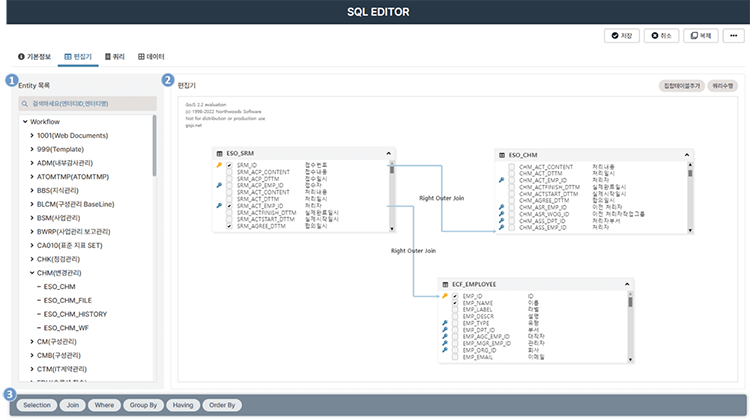
[Figure 1. SQL EDITOR Basic Editor Screen]
1. Entity List Area
- View and add Entity Tables to the editor.
- Drag and drop Entity Tables into the editor.
2. Editor Area
- Add Entity Tables and union tables to configure the FROM clause.
- Select fields to include in the SELECT clause.
- Define table joins by linking fields.
3. Advanced Options Area
- Configure additional query options such as WHERE, GROUP BY, HAVING, and ORDER BY.
Union Table Configuration Screen
This screen enables users to combine multiple tables into one using Union.
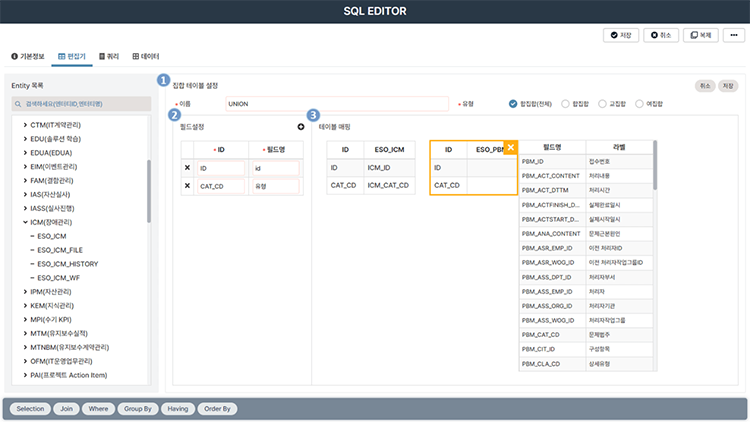
[Figure 2. SQL EDITOR Union Table Configuration Screen]
1. Union Table Settings
- Define the union table name (alias) and type.
2. Field Settings
- Configure fields for the union and map corresponding fields from each table.
3. Table Mapping
- Drag and drop tables from the Entity list.
- Map fields from selected tables to union fields.
Advanced Options Configuration Screen
Based on tables and fields defined in the editor diagram, users can set conditions, sorting, and grouping for more advanced queries.
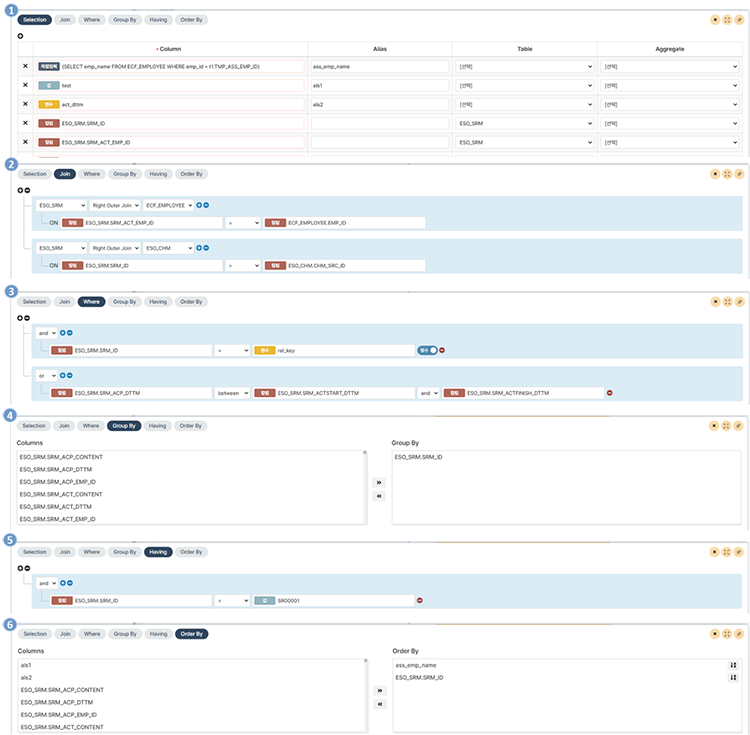
[Figure 3. SQL EDITOR Advanced Options Screen]
1. Selection
- Configure fields for the SELECT clause.
- Add custom fields beyond those defined in tables.
2. Join
- Define table joins and join conditions.
3. Where
- Set conditions for the WHERE clause.
4. Group By
- Define columns for grouping queries.
5. Having
- Set conditions for the HAVING clause in grouped queries.
6. Order By
- Configure sorting criteria.
Summary
SQL EDITOR allows users without SQL expertise to easily create queries through intuitive screen interactions. It standardizes query quality regardless of user skill level. With this functionality, citizen developers lacking coding knowledge can use the no-code EGENE platform to build diverse services.
Kim Miso, R&D Team, STEG Inc.