
 Contact

Community
Ensuring Project Management Efficiency with E-GENE PMS (Project Management Systems)
- Date2022.11.04
Ensuring Project Management Efficiency with E-GENE PMS (Project Management Systems)
STEG provides various business service environments through its proprietary Workflow engine, which also supports integration with ITSM. Based on this engine, STEG offers the E-GENE PMS solution for project management.
We have launched an upgraded version of E-GENE PMS, improving upon the previously provided PMS.
When executing diverse projects, a management solution that meets various project management requirements is essential. Each project consists of plans, schedules, and progress tracking, which serve as the foundation for managing quality, issues, human resources, task assignments, requirements, development lists, and testing. These elements are interrelated, making manual project management extremely challenging.
To overcome these difficulties and ensure successful project execution, as well as post-project history and result management, a more systematic approach is required. With STEG’s upgraded Project Management System (PMS), you can now experience true efficiency in project management.
E-GENE PMS operates as an independent PMS solution while closely integrating with the underlying ITSM solution to monitor overall business management status and track implementation details. The solution includes standard workflow methodologies, enabling quick creation and editing of workflows suited to each project. Through workflow allocation and approval, it supports flexible progress and performance management. Below are the key features of E-GENE PMS:
WBS Management
To ensure effective schedule management, the solution provides WBS workflows based on standard methodologies. Users can add or modify detailed workflows. A Gantt Chart visually displays progress for each workflow, and based on planned start and end dates, the system automatically calculates total duration, total workload, and planned workload. It also provides planned (%) vs. actual (%) progress and task completion rates.
Each workflow is assigned to a responsible person, and upon task completion, PM approval enables progress tracking.
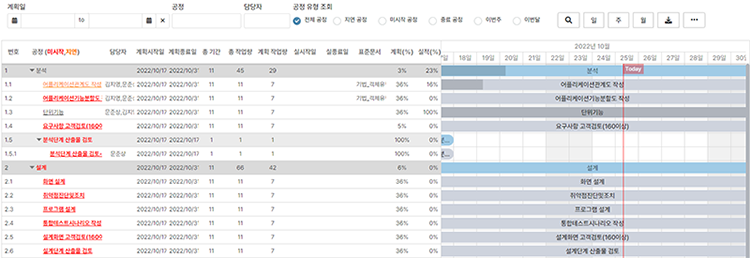
[Figure 1. WBS Management Screen]
Requirements Management
Users can register and manage project-defined requirements. After registering grouped parent requirements, detailed requirements can be added. Detailed requirements follow the process: Registration > Review > Approval > Confirmation, and are finalized upon approver approval.

[Figure 2. Requirements Management Screen]
Confirmed requirements link to development lists and test scenarios, providing visual traceability of how requirements are implemented and progressed.

[Figure 3. Requirements Traceability Screen]
Development List Management
Manage development lists for functions based on project requirements. Each function can be registered under a parent function (program-development list).
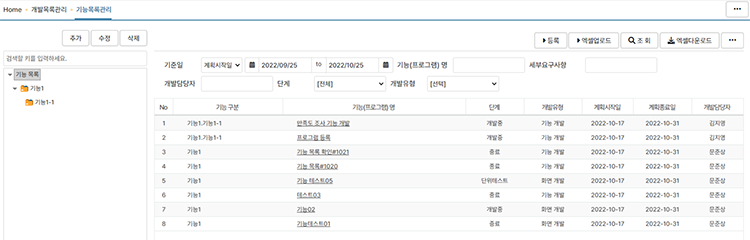
[Figure 4. Development List Management Screen]
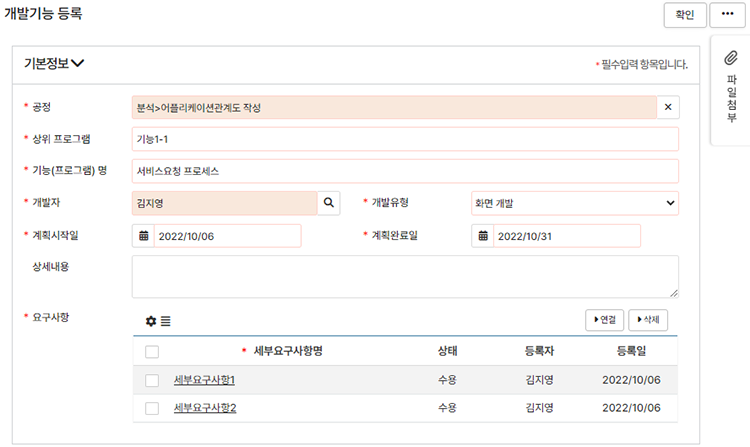
[Figure 5. Development List Registration Screen]

[Figure 6. Unit Test Details in Requirements Traceability Screen]
Test Management
Provides functionality to create test cases during the project testing phase, link them, and assign them to testers.
Each test case links to related requirements, enabling traceability and tracking of test results per requirement. Users register individual test cases and create integrated scenario pools through test case linking. Tests may run multiple times (e.g., first and second rounds), and a single test case may link to multiple integrated scenarios, so management is divided into test cases and integrated scenarios.

[Figure 7. Scenario Management Screen]
Integrated testing follows the process: Registration > Integrated Test > Test Review > (Defect) > Test Review > Completion. If a test fails, the defect management process is triggered, ensuring defects are resolved before test completion.
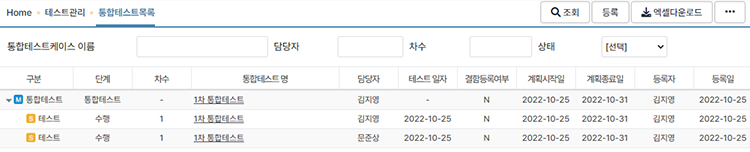
[Figure 8. Integrated Test Management Screen]
Drive
Retrieve and download deliverable files defined/registered in WBS workflows. When deliverables are registered during workflow processing, they can be accessed and managed via the Drive menu. Non-official files can also be uploaded to the Drive. Uploaded files are version-controlled, allowing users to view previous versions.
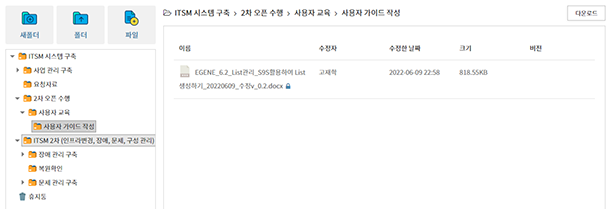
[Figure 9. PMS Deliverable Drive Screen]
Document Management
Document management provides information-sharing capabilities for tasks and work required during project execution. Users can conveniently edit documents online using the document editor for project-related information sharing.
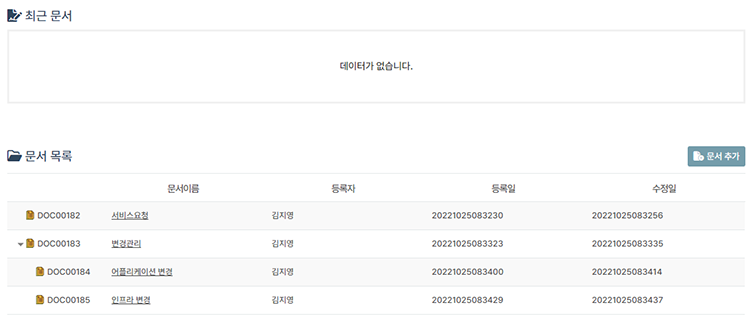
[Figure 10. Document Management Screen]
The above outlines some of the key features of E-GENE PMS. Detailed functionality and usage instructions are provided in the PMS manual.
In addition to the features introduced, E-GENE PMS includes personnel management, defect management, issue management, meeting minutes management, and other essential project management functions. Future updates will focus on improving process efficiency and enhancing module completeness and convenience based on user needs.
Kim Ji-young, R&D Team, STEG Inc.