
 Contact

Community
STEG No-Code Platform Supporting Platform Business
- Date2022.11.17
STEG No-Code Platform Supporting Platform Business
The dictionary definition of “platform” is “a place at a station where passengers board or alight from a train.”
However, since the rapid development and transformation of IT in the 2000s, the term has evolved into a new concept. Today, a platform refers to a business model where various participants interact, becoming producers and consumers as needed, forming connections, exchanging value, and simultaneously fulfilling individual needs.
Representative examples of platform business models include social networking services (SNS) such as Facebook and Instagram, online video services (OTT) like YouTube, Netflix, and Wavve, and real estate direct transaction platforms such as Zigbang and Dabang.
These platforms provide network effects that connect value, reduce effort and costs, and even offer personal branding opportunities to easily realize ideas. However, the reality is that useful platforms are often monopolized by large corporations due to challenges related to manpower, development costs, timelines, and technical expertise, resulting in excessive fees that burden producers.
As a solution, many companies are focusing on no-code and low-code platforms that allow users to easily create new applications without requiring advanced development skills.
STEG, which owns its own platform, provides the E-GENE no-code/low-code platform, enabling anyone to realize diverse ideas at low cost and supporting the creation of various applications.
Business Model Example Using E-GENE Platform
Anyone with a useful idea can create a business model through the platform.
STEG has long provided solutions based on a business workflow engine that systematizes processes flexibly, handling roles for business tasks, users, and processors. Through years of user experience, STEG evolved its proprietary platform into a low-code/no-code format, and now offers the E-GENE platform so anyone can create web applications.
Through the STEG platform, even those lacking IT expertise can incorporate business ideas effectively, as the LCNC (Low-Code/No-Code) platform provides clear direction.
One example is DCatGene, a case where initial costs were minimized, and the focus was placed on products and services to realize a concrete business model.
Platform Business: DCatGene
DCatGene, implemented quickly using the E-GENE platform, is an SNS-based pet platform that connects and shares all information about pets and their owners.
It provides a specialized integrated service platform offering health information, customized food, and snacks based on DNA analysis data obtained through pet genetic testing. To meet consumer needs, it supports multiple device environments (web/mobile) and enables producers and consumers to design, implement, and manage customized sites, including post-service management.
DCatGene Login Screen
The login screen was developed for both web and mobile, supporting Google login and Apple login for iPhone users.
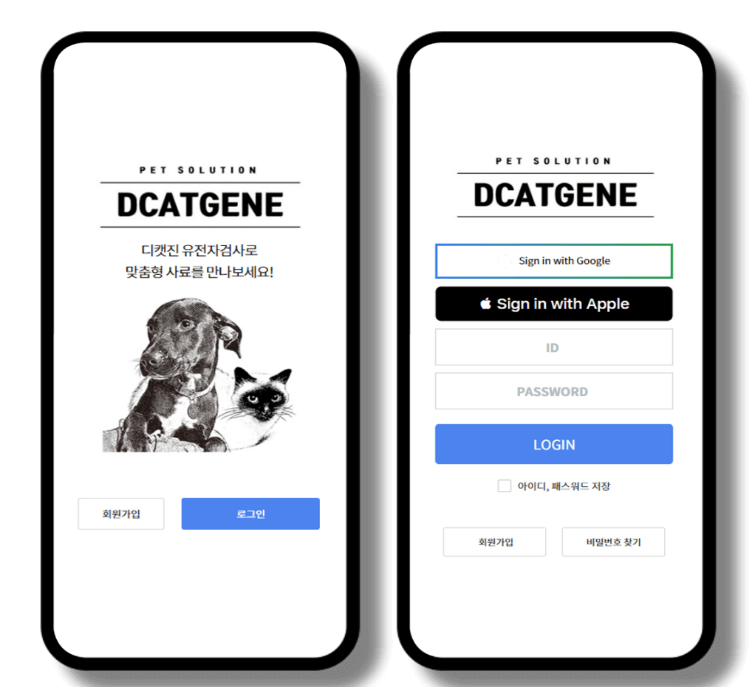
[Figure 1. Mobile Login Screen]
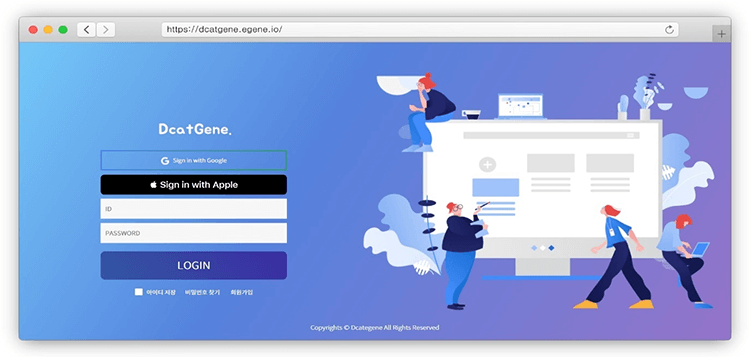
[Figure 1-1. Web Login Screen]
DCatGene User Portal
Frequently used menus such as Test Guide, Test Application, DCatGene Doctor, and PetMart are accessible directly from the home screen using SSD widgets for convenience.
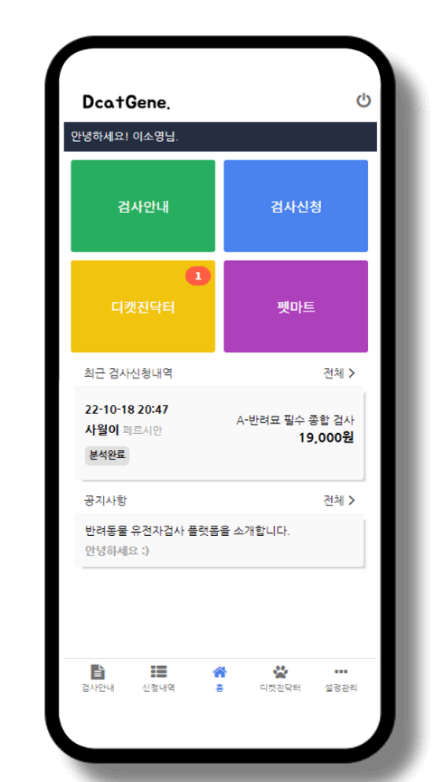
[Figure 2. Mobile Portal Screen]
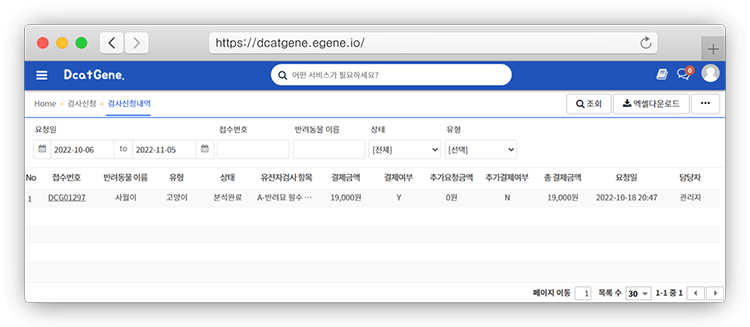
[Figure 2-1. Web Portal Screen]
Genetic Test Procedure and Item Guide
User Mobile Screen
Mobile screens display menus like “Test Items” and “Test Procedures,” registered by administrators to guide users through genetic testing.
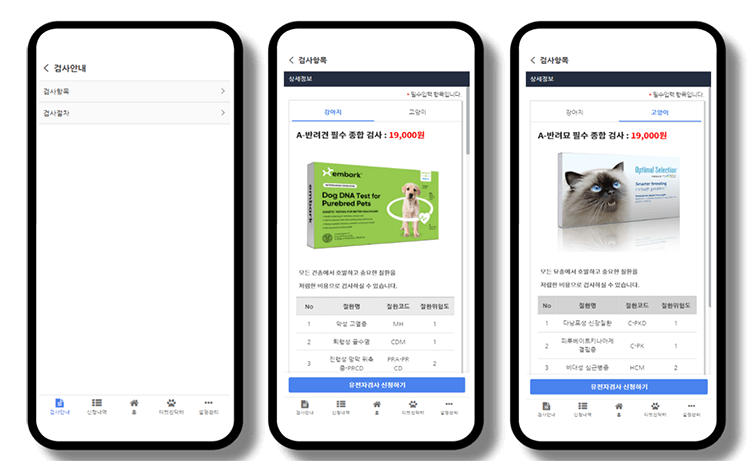
[Figure 3. Test Items Mobile Screen]
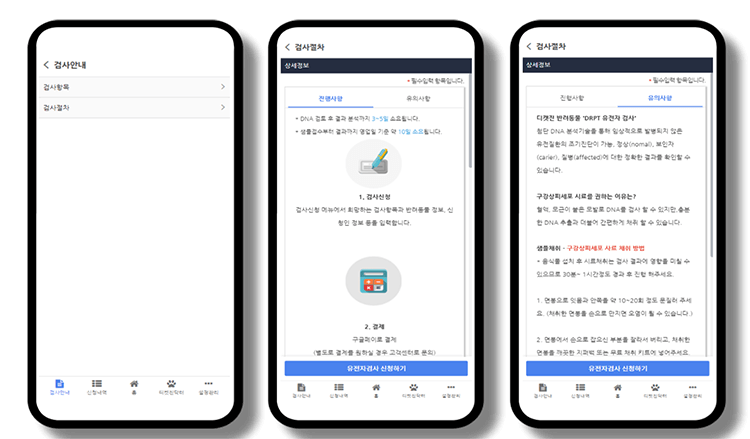
[Figure 4. Test Procedures Mobile Screen]
Administrator Test Item Management
Administrators can easily register and manage genetic test items.
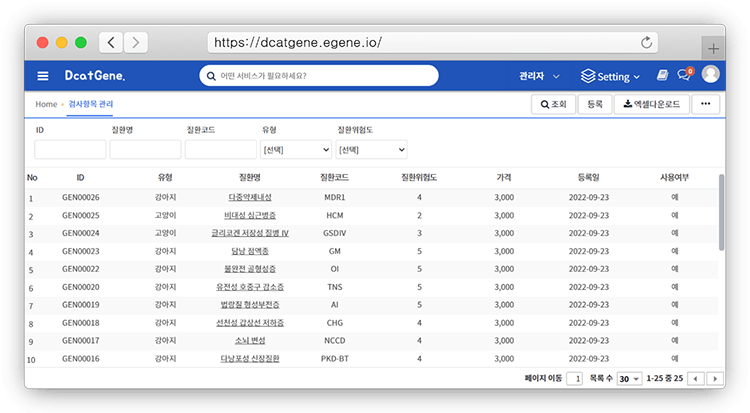
[Figure 5. Admin Web Screen – Test Item List]
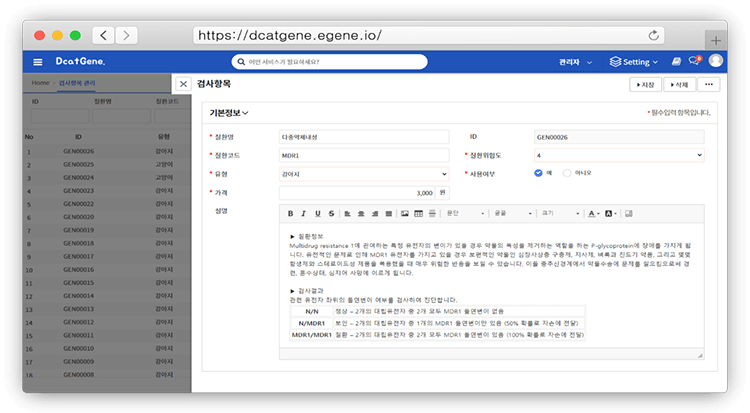
[Figure 5-1. Admin Web Screen – Test Item Form]
Administrator Test Item Group Management
Provides functionality to group genetic test items for easier management and user information delivery.
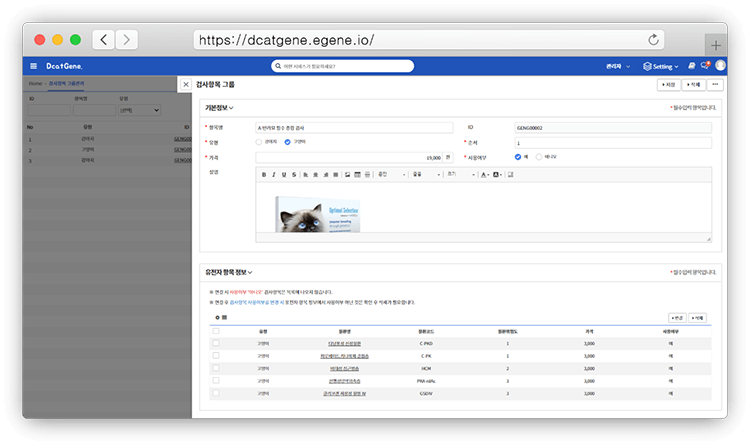
[Figure 6. Admin Web Screen – Test Item Group Management]
Administrator Test Procedure Management
Allows convenient management of test steps and precautions. New registrations display the latest content on user screens, enabling history tracking.
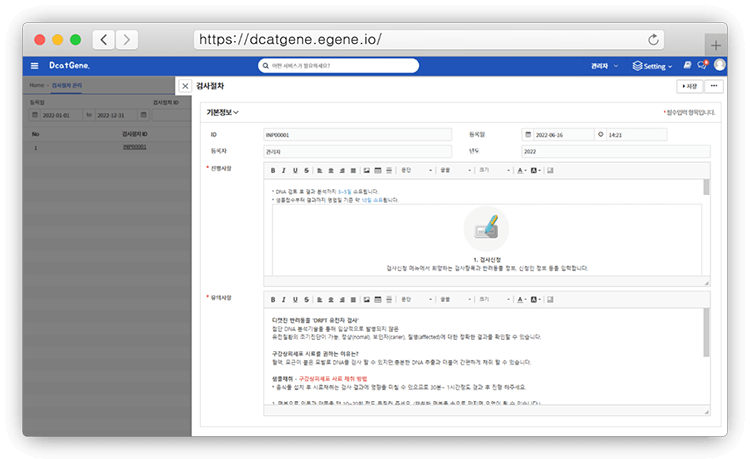
[Figure 7. Admin Web Screen – Test Procedure Management]
Easy DNA Genetic Test Application
Includes terms and electronic signature, pet selection, and item selection based on pet type for a streamlined application process.
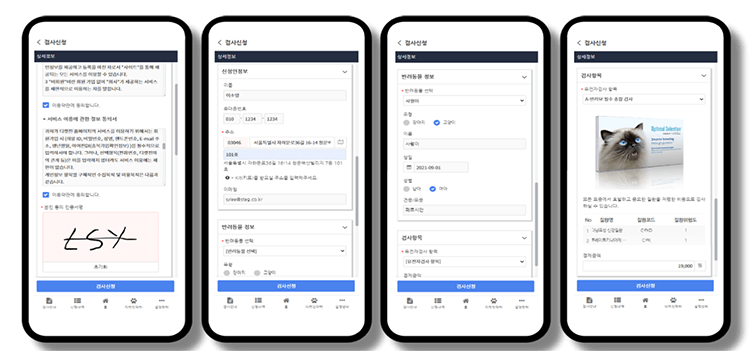
[Figure 8. Test Application Form Screen]
Application Details and Quick View
Displays step-by-step information using Step UI for quick user access. 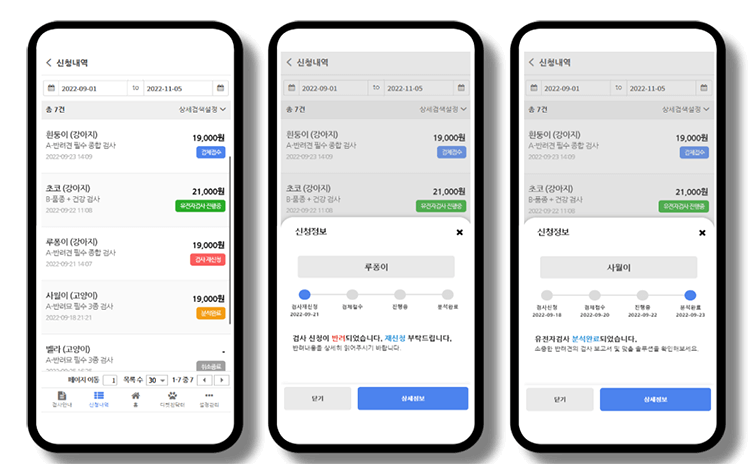
[Figure 9. Application Details and Quick View]
Test Stage Information Management
Administrators manage quick-view information for stages such as Received, In Progress, Analysis Complete, and Reapplication. 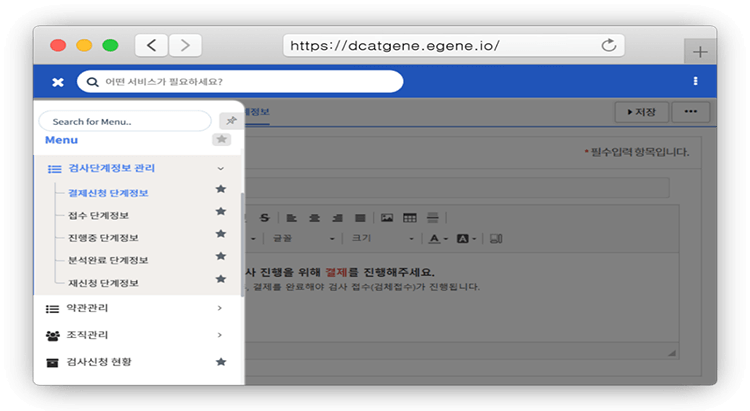
[Figure 10. Admin Web Screen – Test Stage Management Menu]
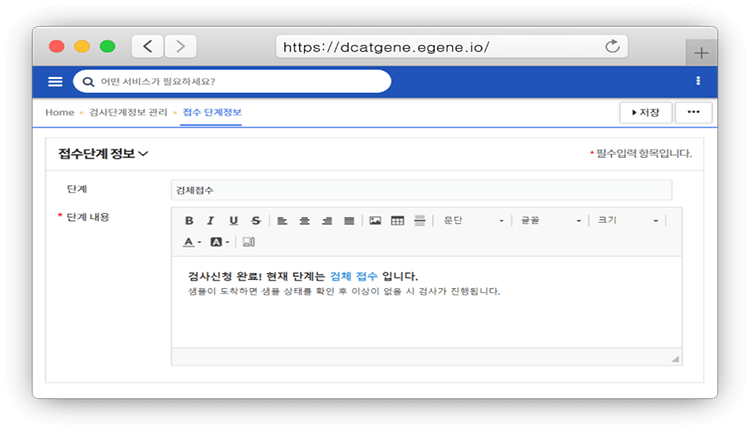
[Figure 10-1. Admin Web Screen – Stage Info Form]
Electronic Payment Function
Integrated with Inicis payment module for fast transactions via mobile, PC, and app. 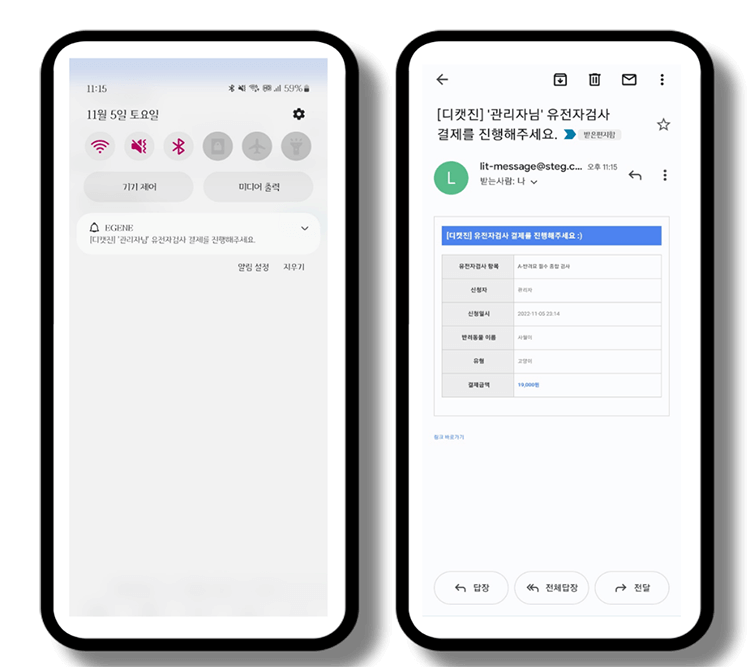
[Figure 11. Payment Request App/Email Notification]
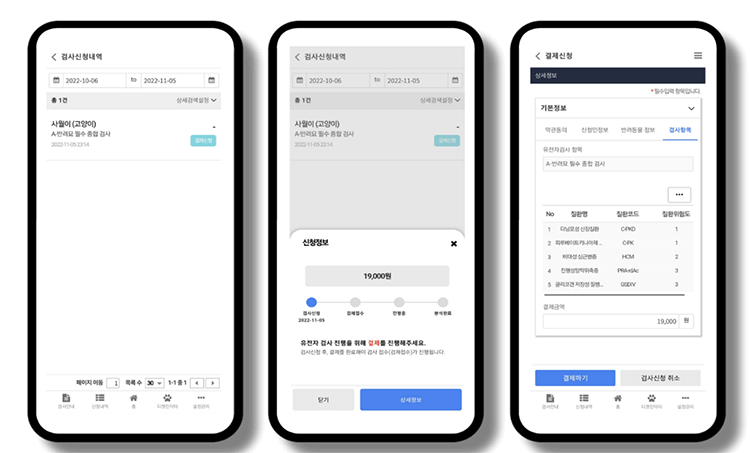
[Figure 11-1. Payment Application Details and Form]
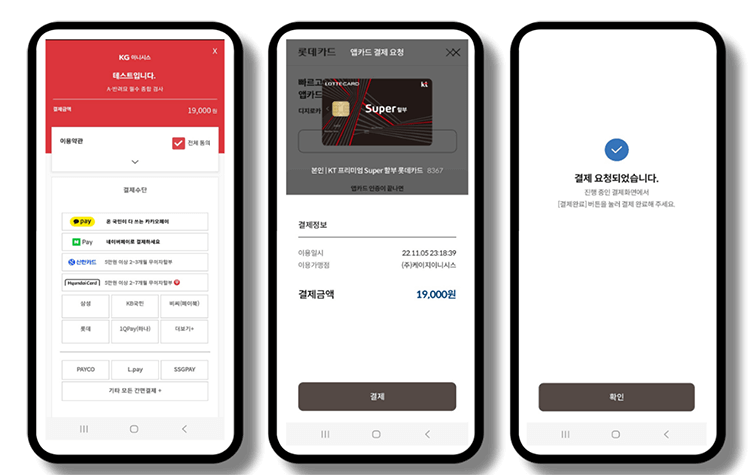
[Figure 11-2. Mobile Payment Screen]
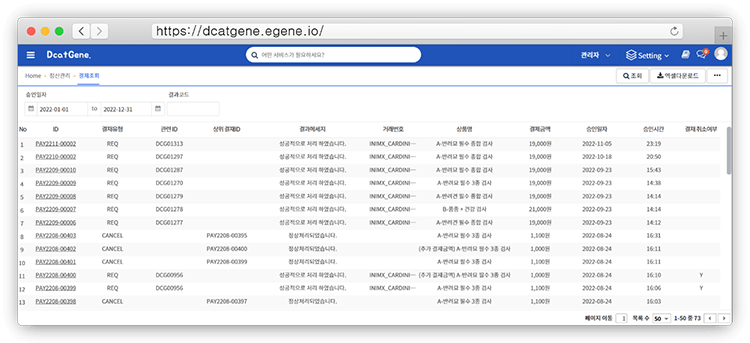
[Figure 11-3. Admin Web Screen – Payment Settlement Management]
DNA Genetic Test Processing
Test Application Status
Administrators manage test tickets for sample receipt and processing. 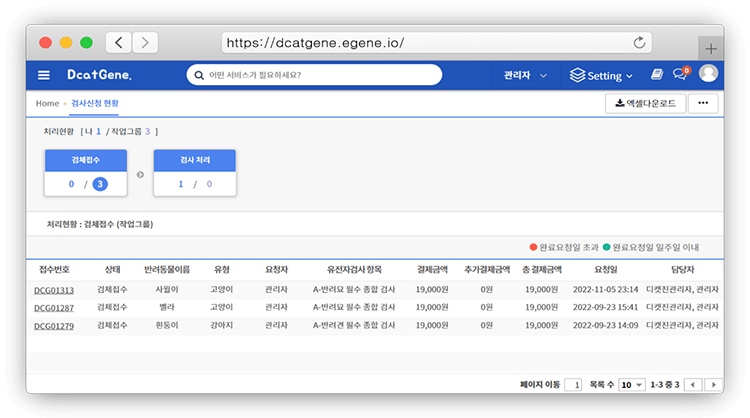
[Figure 12. Test Application Status Web Screen]
Test Result Item Management
Manages items required for genetic test processing. 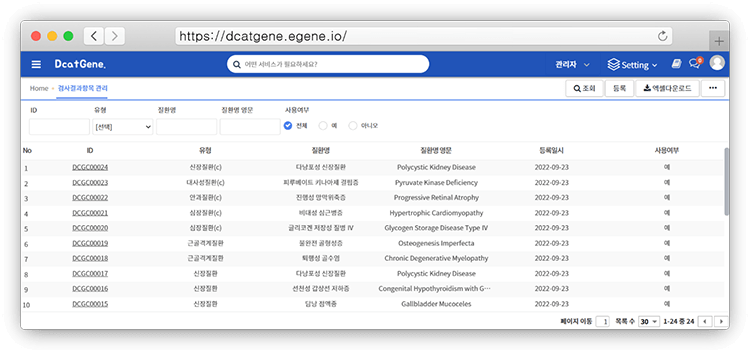
[Figure 12-1. Admin Web Screen – Test Result Item Management]
Test Processing
Displays forms for processing genetic test applications, allowing selection by type and result handling via pop-up lists.
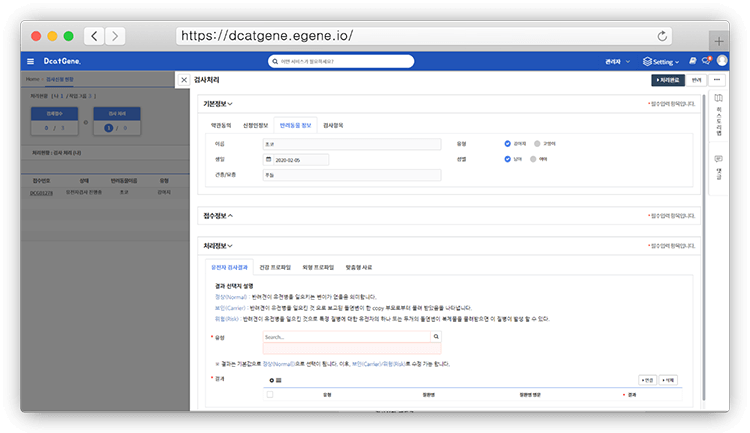
[Figure 12-2. Test Application Processing Step Form Screen]
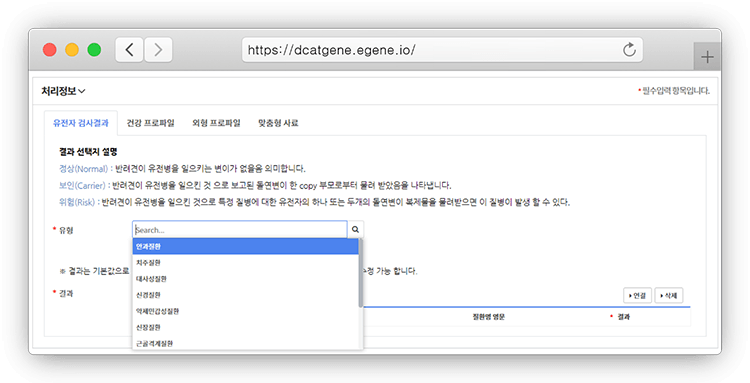
[Figure12-3. Genetic Test Application Processing Step Form Type Selection Screen]
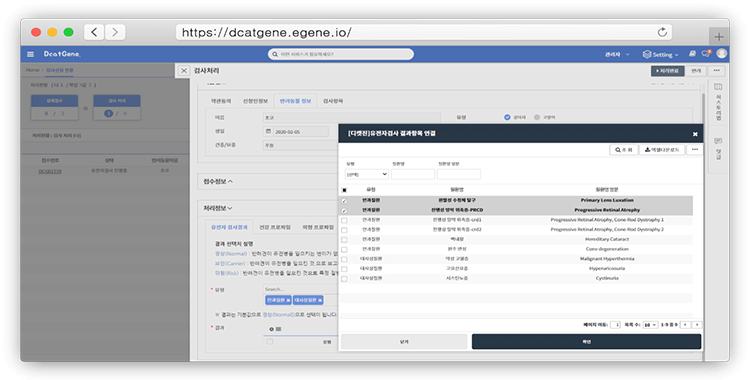
[Figure 12-4. Genetic Test Application Processing Step Form Test Type List Screen]
DCatGene Doctor – Genetic Analysis Results
Genetic Analysis Result Screen
Provides genetic test reports on both web and mobile devices.
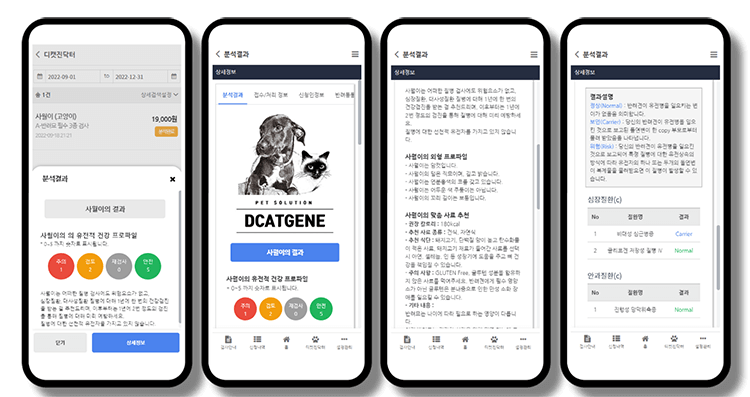
[Figure 13. Mobile Genetic Analysis Result Screen]
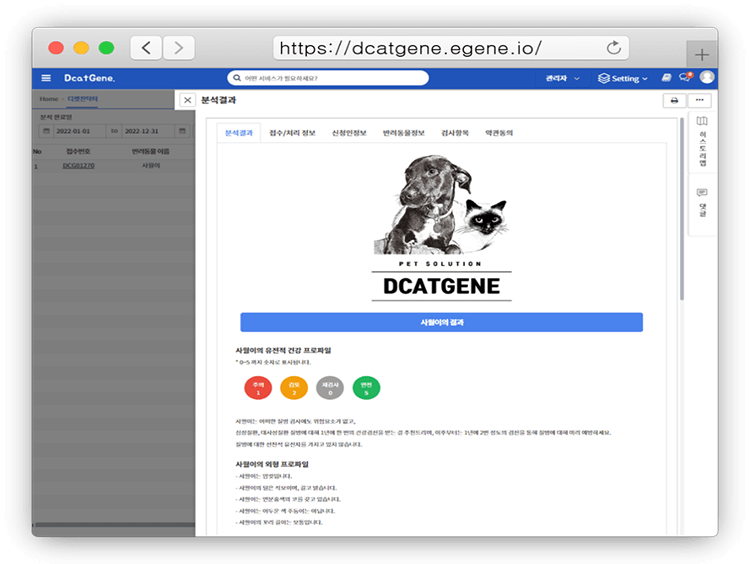
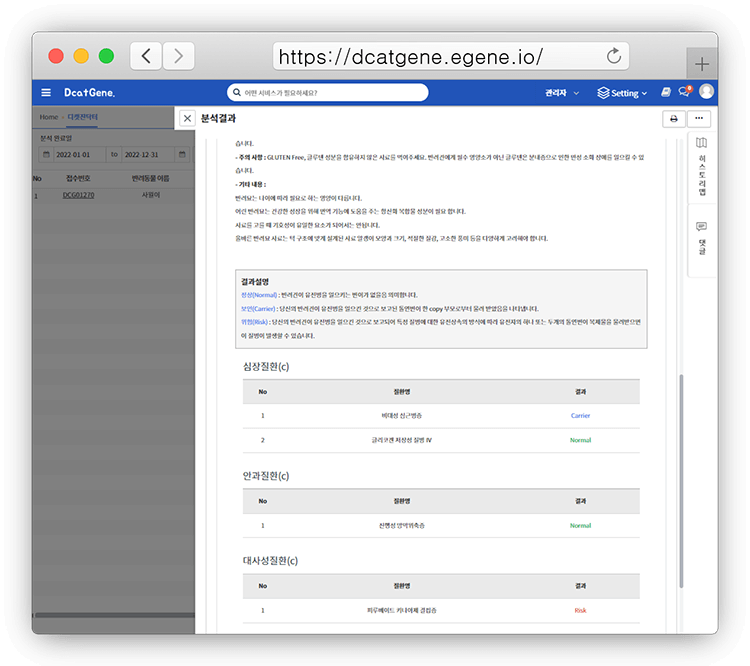
[Figure 13-1. Web Genetic Analysis Result Screen]
Genetic Analysis Report
Users can download reports as PDFs via web interface.
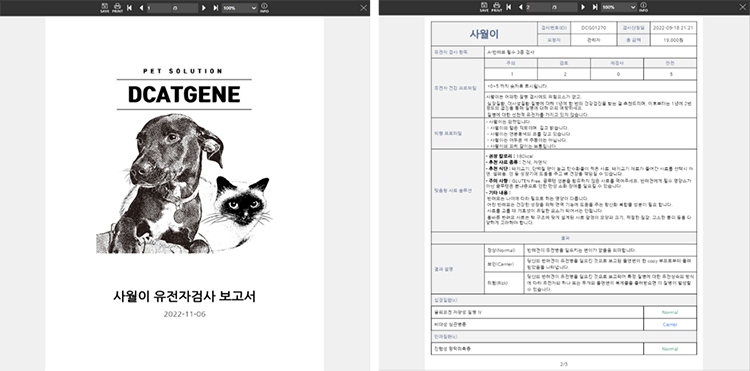
[Figure 14. Genetic Analysis Report]
Pet Profile Management
Allows viewing, registering, and selecting representative pets.
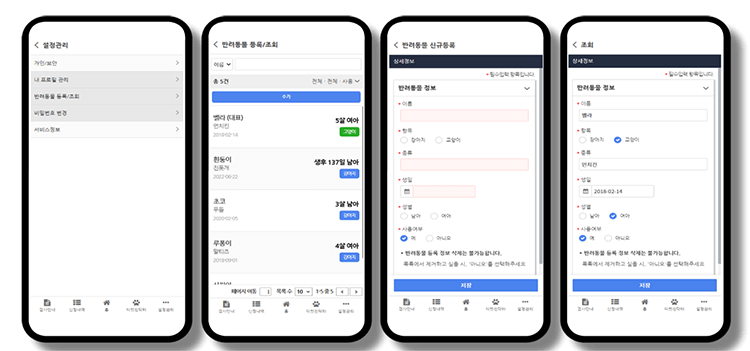
[Figure 15. Mobile Pet Profile Management Screen]
Membership Types (Individual, Corporate)
Registration
Two types of registration forms: individual members can use DCatGene immediately after signing up, while corporate members require admin approval.
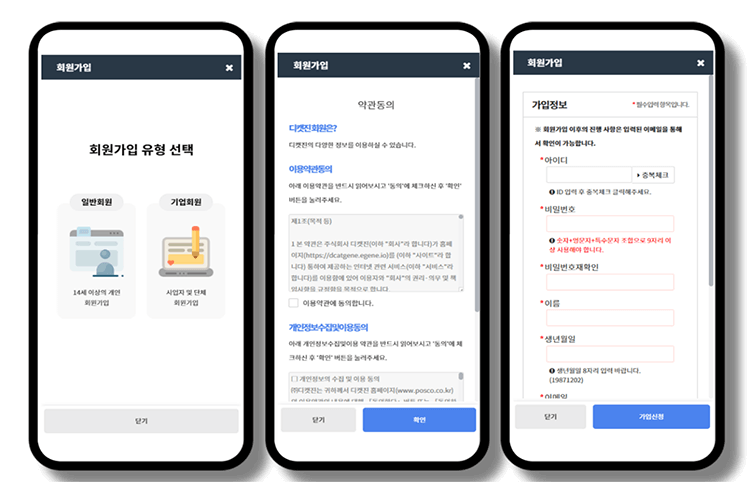
[Figure 16. Mobile Registration Screen]
Terms Management
Administrators can easily manage terms for genetic testing and membership. 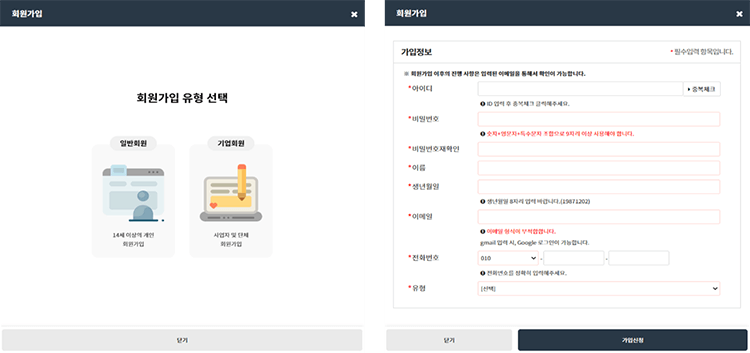
[Figure 16-1. Web Registration Screen]
PetMart – Purchase Food, Snacks, Supplements
Products registered by DCatGene partners for promotion and convenient distribution. 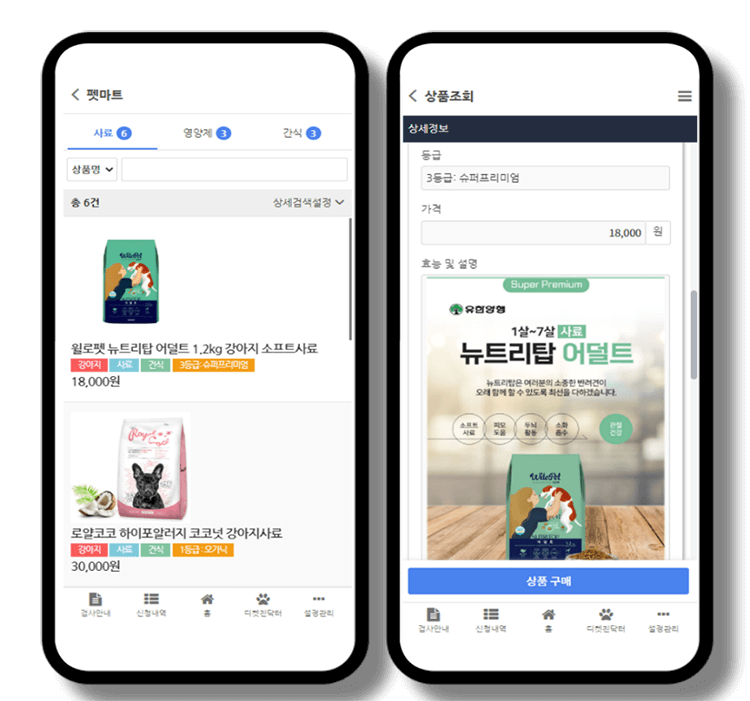
[Figure 17. Mobile PetMart Screen]
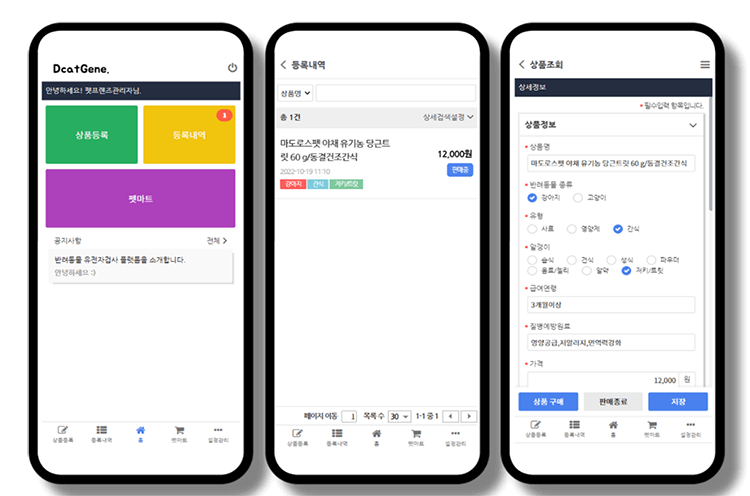
[Figure 17-1. Corporate Member PetMart Registration Screen]
We explored the DCatGene business model implemented using the E-GENE platform from both user and administrator perspectives.
The admin web interface enables dynamic management of user screens through menus like Test Item Management, Group Management, Procedure Management, Terms Management, and Organization Management, creating a service platform focused on post-management.
This business model demonstrates how creative ideas can be materialized and highlights the technical foundation provided by the E-GENE platform for transforming diverse ideas into practical business models.
As the platform industry thrives, we hope traditional companies, startups, and individual entrepreneurs will leverage STEG’s E-GENE platform to reduce initial costs and deliver innovative business models focused on products and services to consumers.
Lee So-Young, PSP Team, STEG Inc.