
 Contact

Community
Changes in Implementation Methodology Through E-GENE Metadata Management
- Date2022.12.12
Changes in Implementation Methodology Through E-GENE Metadata Management
STEG leverages its proprietary no-code platform-based solution, E-GENE, to deliver various IT services and operational efficiency to financial institutions, public organizations, large enterprises, and mid-sized companies.
In this article, we introduce effective data management techniques using the metadata management module provided by the E-GENE solution.
Typical project phases include:
Solution Installation → Analysis/Design → Implementation → Testing → Transition to Operations → Stabilization
Step-by-step activities:
- Install the E-GENE solution on development and production servers.
- Analyze tasks previously managed via phone, email, and Excel, and review the existing (As-Is) system for design.
- Based on the analysis and design, configure workflows, forms, lists, and statistical screens on the development server using E-GENE; set up email and interface-related configurations.
- Test the implemented features on the development server, then transfer E-GENE metadata and source files to the production server.
- Perform ongoing changes after transitioning to operations.
What is E-GENE Metadata?
What is E-GENE Metadata?
Metadata controlled by the E-GENE solution includes:
- Workflow Manager: Enables configuration of business processes.
- Entity Manager: Allows UI-based management of physical table and column creation.
- Form Designer: Builds registration and processing screens via drag-and-drop without coding.
- List Manager: Configures data query UI.
- Relation Manager: Creates relationships between data.
- SQL Manager: Helps citizen developers write SQL without deep technical knowledge.
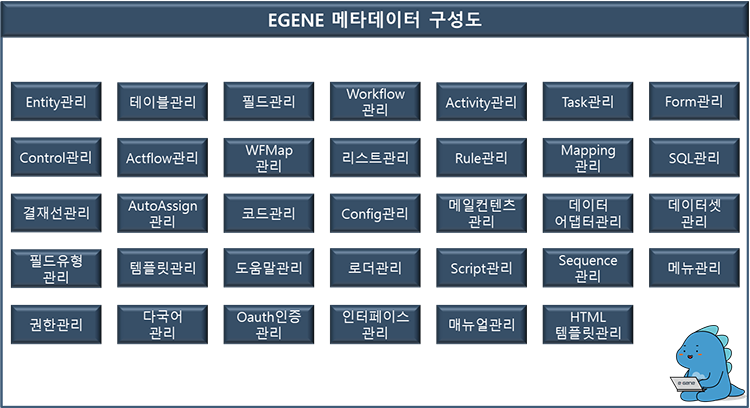
[Figure 1] E-GENE Metadata Structure
Typically, during solution projects, metadata undergoes frequent changes. For operational transition, metadata must be collected separately to create patches, which are then applied. This process incurs overhead and risks missing patch files. Restoring data after patch application is difficult, and multiple developers editing the same metadata can lead to data loss.
To address these issues, E-GENE provides metadata control through its Metadata Management Manager, offering:
A standard framework to track changes (timestamp, user, metadata ID).
Patch management functionality for deploying developed resources to production servers.
Metadata Change History
A screen to view metadata change history, including change date, entity name, changed ID, and user.
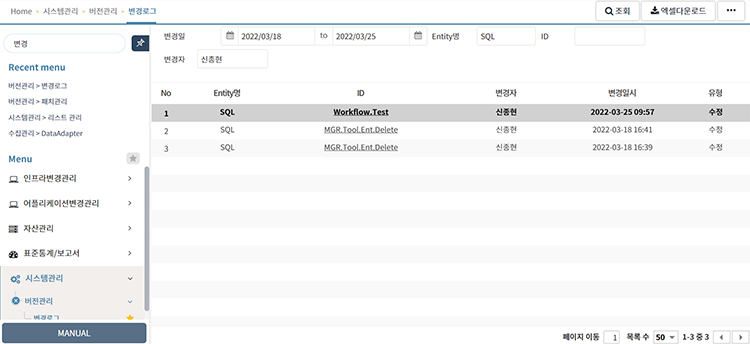
[Figure 2] Metadata Change History View
Clicking an E-GENE metadata ID displays detailed information for each changed item.
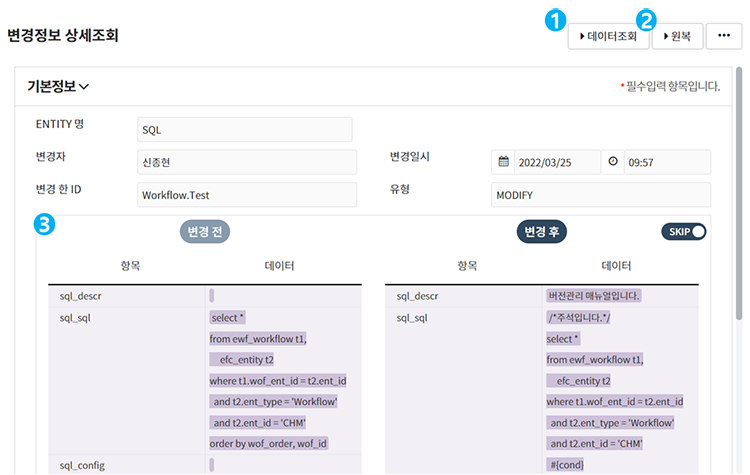
[Figure 3] Metadata Change History Details
■ Displays current version data in Form UI format.
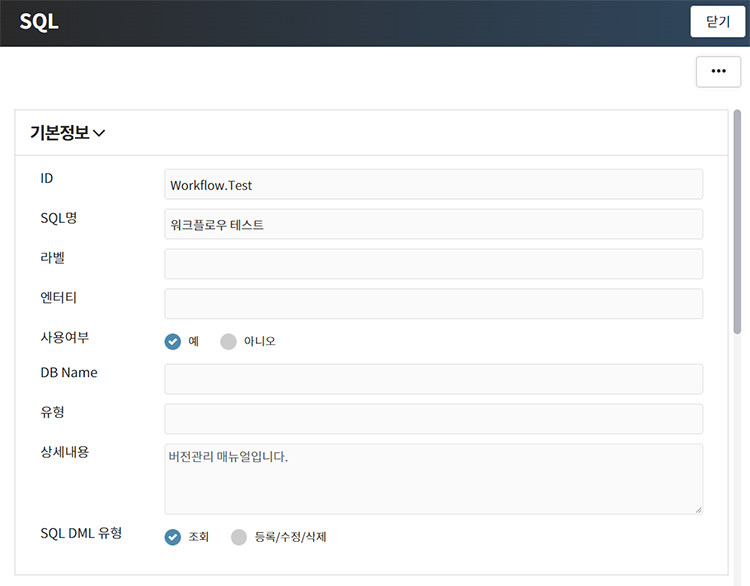
[Figure 4] Current Version Data Form View
■ Allows reverting metadata to previous data.
3. Field-Level Comparison
■ Shows added/modified/deleted information for each item. 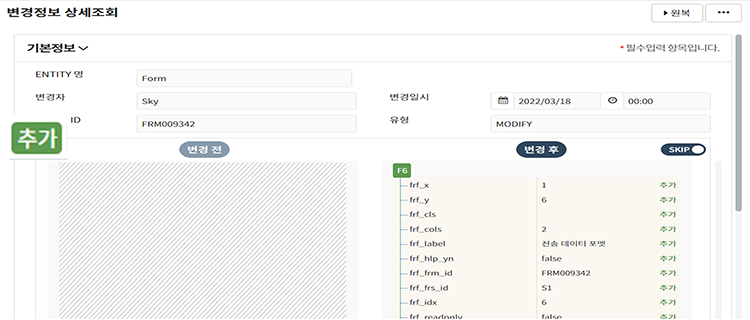
[Figure 5] Added Data Comparison
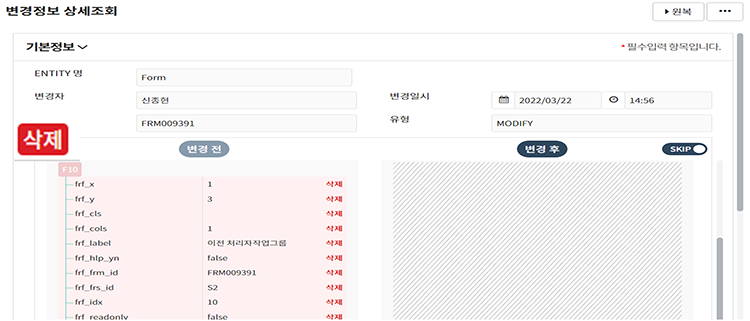
[Figure 6] Deleted Data Comparison
Metadata Patch Management
When metadata changes occur more than once, they appear in the patch management list, enabling patch file creation.
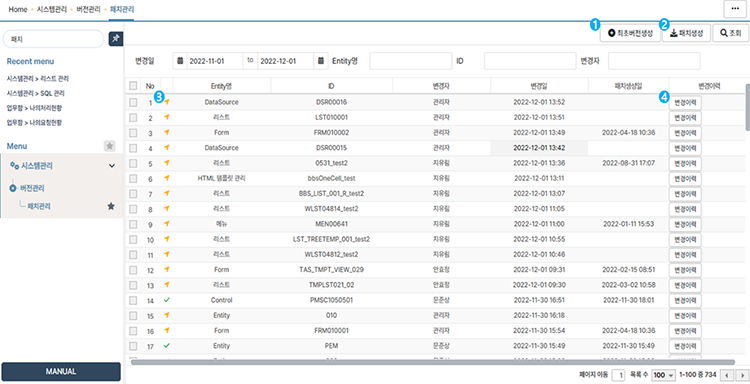
[Figure 7] Metadata Patch Management
■ Deletes metadata change history and sets current metadata as the initial version.
2. Create Patch
■ Generates a ZIP patch file for all or selected metadata.
3. Patch Creation Status

4. Change History
■ Displays detailed lists of changes based on E-GENE metadata.
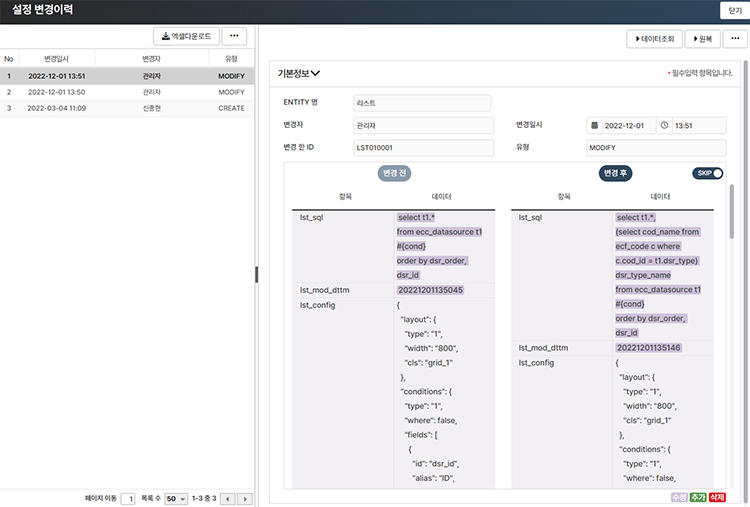
[Figure 8] Metadata Settings Change History
The described metadata management features—change history and patch management—help resolve data management issues during project execution and development.
Recommended principles for efficient metadata management:
- Avoid shared accounts among project team members to clearly identify data changers.
- Use patch management to verify metadata changes and patch creation status.
- Apply patches using files generated through patch management for proper version control.
Following these principles ensures data preservation and stable management during metadata changes. Leveraging patch management also reduces overhead for creating patch files during operational transition, significantly benefiting projects.
Shin Jong-hyun, R&D Team, STEG Inc.