
 Contact

Community
Major Upgrade Case of the ITSM System at the Health Insurance Review & Assessment Service (HIRA)
- Date2023.12.19
Major Upgrade Case of the ITSM System at the Health Insurance Review & Assessment Service (HIRA)
The ITSM upgrade project for HIRA was part of the 2023 internal and external business service improvement initiative led by NDS (Nongshim Data Center), which handles integrated maintenance. HIRA had been operating STEG’s ITSM product, Egene ITSM 3.5, since 2015, ensuring stable operations for many years. This project aimed to reflect accumulated process improvement requirements and adopt new technologies by performing a major upgrade to Egene 6.3, based on the existing processes and data.
The challenge was to accommodate improvements that were difficult to implement in the old version while maintaining a consistent user experience. To minimize retraining time, menus and functions from the previous version were redeveloped with the same UI layout.
This article focuses on data migration, process tuning, and new feature development implemented during the project.
1. Data Migration
1) Use of REP (Reusable Engagement Package)
※ What is REP?
- Abbreviation for Reusable Engagement Package
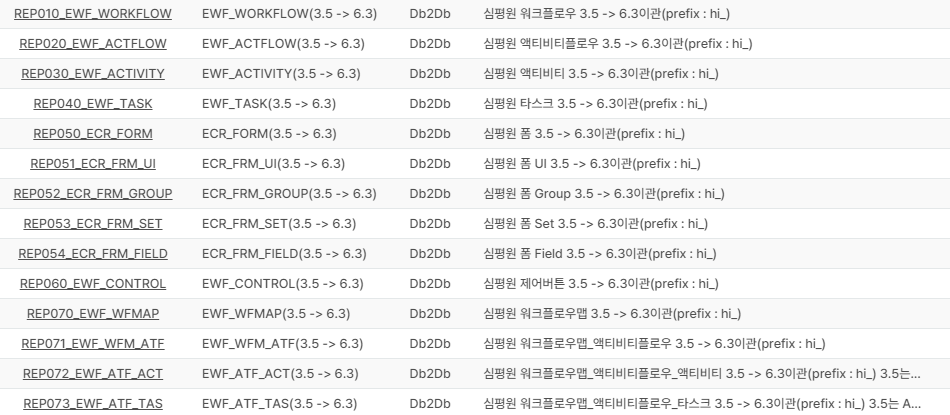
< REP configuration for migrating entire workflow-based structures >
REP is a feature that applies the Data Adapter supported within the solution. It uses the DB-to-DB method within the Data Adapter to map past process data to process-related tables in the new DB, significantly reducing the time required for data migration and process transfer.
To create a process, you need to align the structure of Entity – Workflow – Activity – Task – Form. In upgrade projects, this is usually done manually to ensure consistency, which involves converting data and synchronizing it. However, when building complex processes such as request → receipt → processing → incident transfer/problem transfer/knowledge transfer → approval → closure, there were cases where items or functions were omitted. To prevent data loss and ensure identical process construction, additional review time was required, inevitably increasing the overall build time.
During the HIRA project, the initial development period for the service request process was about 3 days, and it took about 5 days to verify and modify internal logic so that it could run on the current system. After completing the manually written process, we configured REP and used it as a test case to transfer the same process. The process transfer took about 5 minutes, and internal logic verification and modification took about 3 days.
Although there was room for shortening the verification and modification stage since internal logic analysis had already been performed once, reducing the process data transfer time from about 3 days to 5 minutes was highly effective.
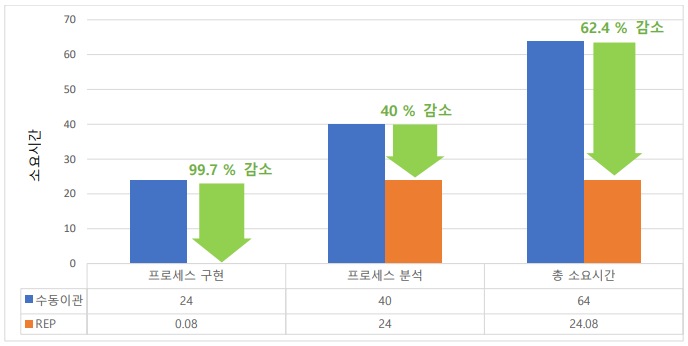
< Diagram showing significant reduction in manual migration time using REP >
However, one drawback was that HIRA’s version was 3.5, which was much older compared to typical upgrade projects from versions 4 or 5. Therefore, there were differences in schema information and data loading/output logic between version 3.5 and 6.3. As a result, even after using REP, some items required post-processing, and we had to modify table information to complete the transfer.
If REP is to be used extensively, it will be necessary to organize how schema information and data loading/output methods differ across versions. If these differences are documented and REP can be applied according to specific versions, it will become an even more complete and effective tool.
2) Use of Patch Functionality
※ What is Patch?
- A feature supported within the solution that processes data in XML format, enabling data transfer and application between solutions.
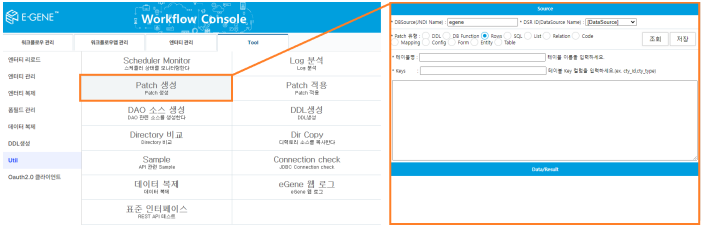
< Low-code-friendly patch feature usable with basic SQL knowledge >
Patch functionality is useful for data picking because it allows you to select specific data from a table using a simple SQL SELECT statement. During initial data migration, we collected specific data based on REG_DTTM (registration date) when tickets were created in the solution and created patches for transfer.
This method was chosen because it allowed us to clearly define the timing for the second migration after the first migration. However, it was not suitable for transferring 4 million records. When transferring large amounts of data using patches, the solution experienced load issues, and performance slowed down when there were many string data fields in the patch. Although patch functionality was not originally designed for pure data migration, the intermediate artifact (patch) could serve as evidence documentation. If speed and load issues are resolved, patch functionality has potential to be expanded as a migration tool.
3) Use of Data Adapter DB-to-DB
- Transfers AS-IS DB data to TO-BE DB tables using internal mapping.
- Enables migration without external DB tools or elevated permissions.
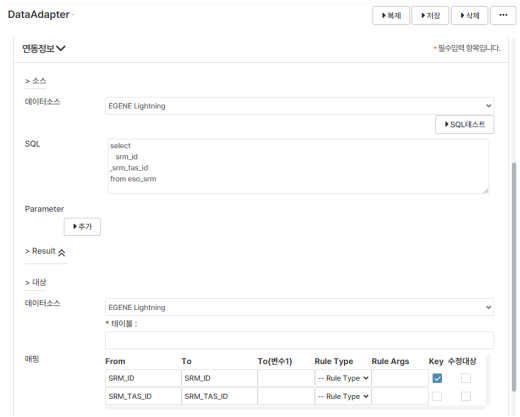
< Data Adapter loading data via DB-to-DB using registered connection info >
After testing patch-based migration, we found speed limitations and attempted to use the Data Adapter feature to connect the AS-IS DB and TO-BE DB and transfer data through the solution. Unlike patch migration, this method did not produce intermediate artifacts and allowed table-level mapping without splitting data, which was useful and faster than patch migration.
However, transferring 4 million records still required a long time, and the solution experienced load issues similar to patch migration. This was not a problem that could be solved by temporary service suspension. Ultimately, for the second migration, we requested DB permissions from the client and used DB Link with a DB tool to transfer data directly.
4) Query Tuning and Indexing
After data migration, some lists took a long time to load. Upon investigation, the issue was caused by hierarchical queries that included subqueries and DB functions. To improve speed, we removed unnecessary DB functions and added indexes to columns used in hierarchical query conditions.
For tree lists drawn hierarchically, the logic rendered all rows before applying pagination, which resulted in slow output from the user’s perspective. To resolve this, we developed and applied a feature that displays lists with indentation like tree lists but uses pagination for better performance.
2. Process Tuning
Based on data transferred using REP and other migration methods, we handled errors found during process testing using the following approaches:
1) Cleaning up unsupported atoms
In Egene 3.5, UIITEM values were displayed based on atom data. If an atom was no longer supported or unused in Egene 6.3, it caused display issues. Non-standard atoms were manually replaced with alternative atoms to ensure proper output. In the future, if the system can check whether UIITEM values in form fields are standardized atoms, cleaning up unsupported atoms will be more efficient.
2) Modifying SQL defined inside atoms
Many atoms used in both Egene 3.5 and 6.3 referenced SQL that had been modified over time. To verify output, we needed to check whether the same atom and data produced identical results. Since SQL references inside atoms were not visible without opening them in the development tool, significant analysis time was required.
Additionally, when migrating the ECR_SQL table, it was difficult to determine whether to overwrite duplicate SQL IDs. If a feature that checks whether SQL is linked to an atom during migration is implemented, analysis time could be reduced.
3) Replacing JSP-based batch functions with solution features
Previously, HIRA used cron jobs in Linux to call JSP files for batch interfaces via jspCaller. This was replaced with the CallFile feature in Data Adapter, which works similarly. This change improved transparency and maintainability because the batch logic is now managed within the solution, even if historical information is missing.
3. New Feature Development
1) Rack Layout Visualization
This feature evolved from asset management to provide an intuitive way to manage physical assets based on rack positions. Unlike previous structures, it uses a hierarchical structure: Floor → Zone → Rack → Slot.
Users can specify rack positions using the standard 42U capacity and define start and end units, which are displayed according to the rack management number format.
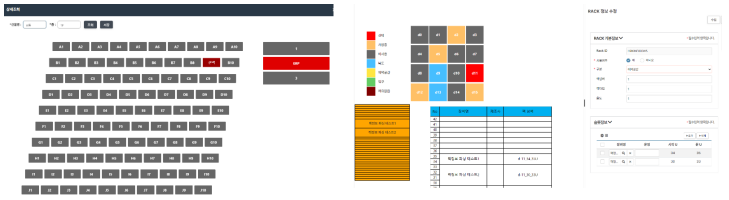
< Left: Previous rack management screen derived from asset management. Right: Newly developed rack management screen >
Unlike previous implementations, this feature requires creating or migrating reference data for floors, zones, racks, and slots. Racks are numbered based on their parent zone, limiting independent rack numbering. Optimizing hierarchical data could enhance usability and value.
2) Project Management
This feature consolidates multiple relational lists into a single form, allowing users to input data freely and perform automatic calculations, similar to Excel. Because each item requires extensive input, we added Excel upload/download functionality to all relational lists for easier data entry and aggregation.
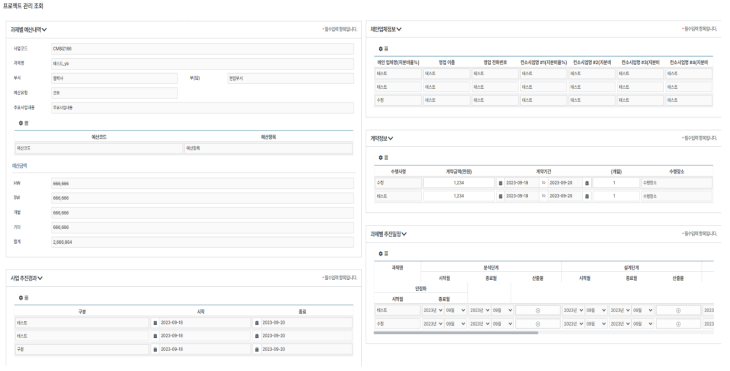
< Multi-input handling and auto-calculation for project management using relational lists on a single screen >
One drawback was that triggering automatic calculation logic when adding or deleting relations required defining separate handlers for each button. There were cases where the logic did not execute because the timing of relation pool loading was unclear, but this was resolved using timers.
Through the HIRA ITSM upgrade project, we realized that there are various methods and approaches tailored to client conditions. REP demonstrated the potential for efficient process migration, and process tuning helped maintain user experience.
The methods described in this article were applied during this upgrade project, made possible because Egene has consistently evolved to accommodate diverse user requirements and emerging IT technologies. Although there were some challenges, we ultimately resolved them by leveraging the solution’s flexibility. This adaptability is Egene’s strength, and we believe that continuous version upgrades will make Egene an even more advanced solution in the future.
Park Hyun-moo, PS2 Team, STEG Inc.